Soloist
Soloist is a client portal for solo software engineers - a way to run solo but deliver like an agency. It connects to your GitHub, auto-pulls your commits, PRs, and releases as draft updates, and lets you curate them into plain-English progress your clients can actually follow. You publish; each client gets a branded, real-time feed of what shipped, what's in progress, and what's next - without ever seeing the raw repo. A full-stack, multi-tenant SaaS, currently in active development and dogfooded on real client work.
The problem
Solo developers do agency-quality work with none of the agency machinery. So clients get their updates as a scattered trail of status texts, screenshots, and 'any progress?' messages - which makes even great work feel disorganized, and leaves the freelancer doing client comms by hand.
The information is right there in GitHub - every commit, PR, and release - but it's in a language clients don't read, mixed with noise they shouldn't see. The gap isn't the work; it's the visibility around it.
Soloist's bet comes straight from its tagline: run solo, deliver like an agency. Give clients the organized, branded experience of a team, without the overhead of being one.
Run solo, deliver like an agency
Soloist has two surfaces from one codebase. The Cockpit is where you, the freelancer, run every engagement: connect a client's repos, review what GitHub surfaced, and decide what's worth telling them. The Client Portal is what they see - a clean, branded, mobile-first feed of progress, and nothing else.
Each engagement is one client's workspace. They get a real-time view of what shipped, what's in progress, and what's next - the experience of a well-run team - while you stay a team of one.
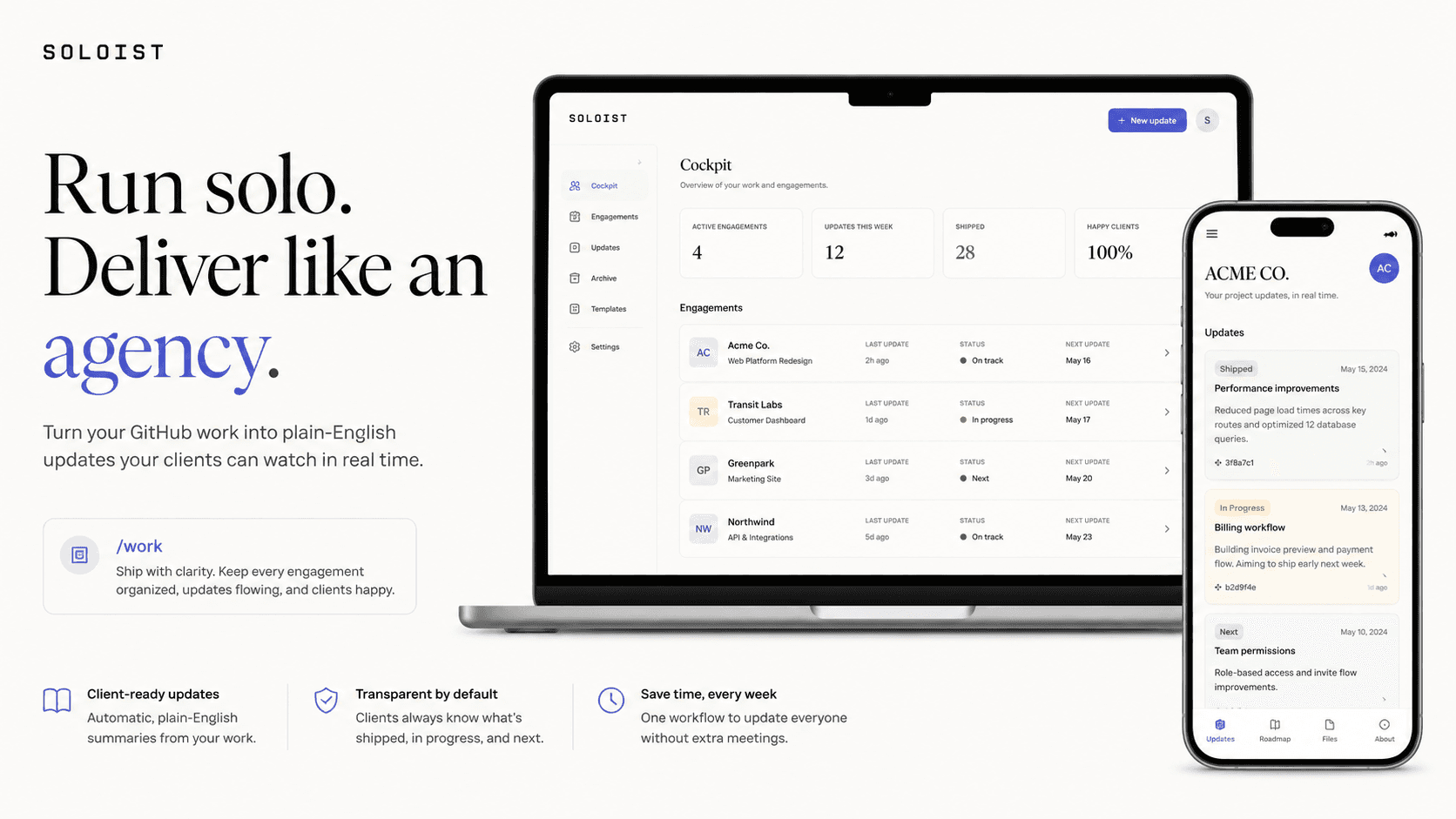
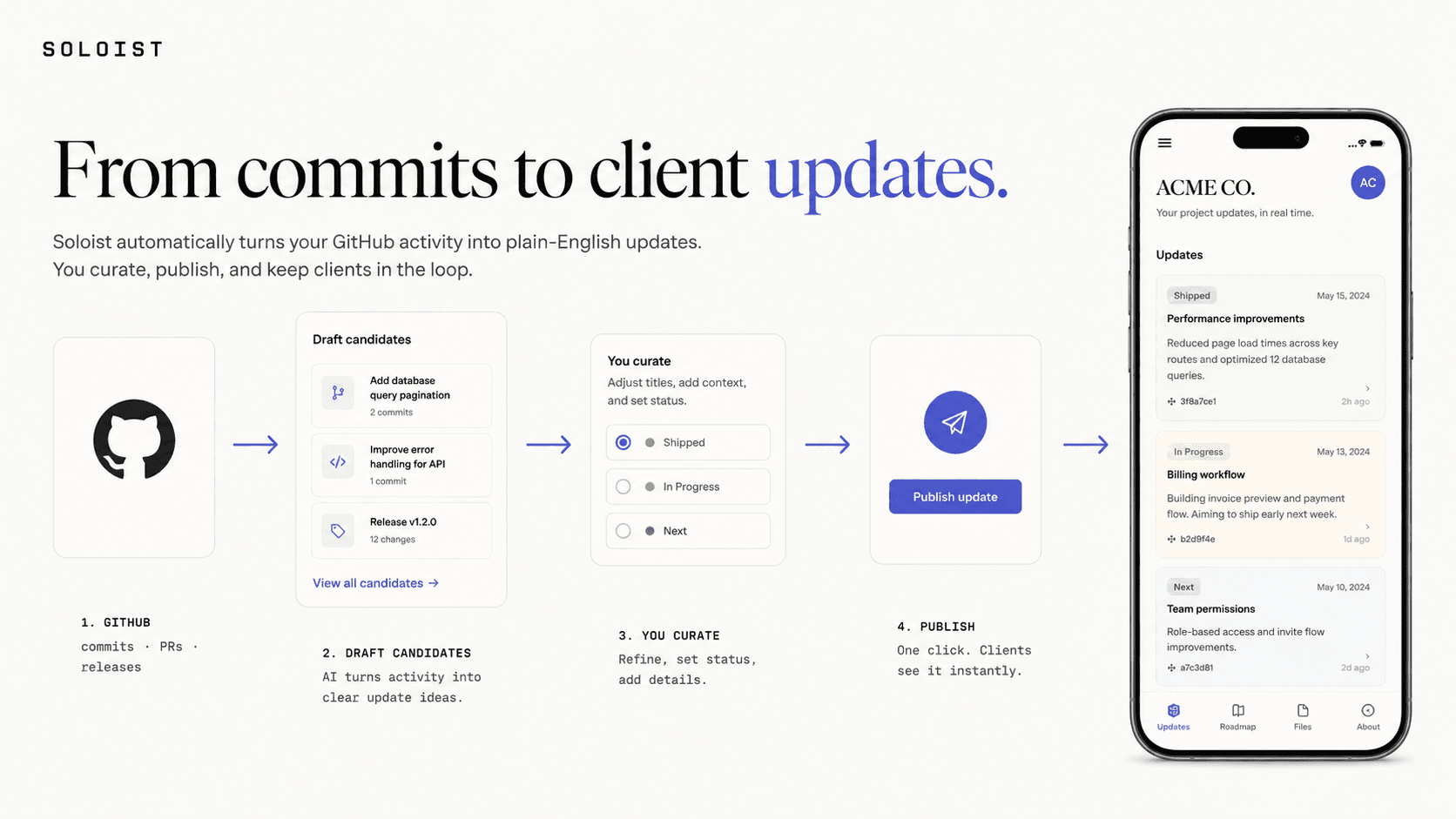
The Ship Feed: from commits to client updates
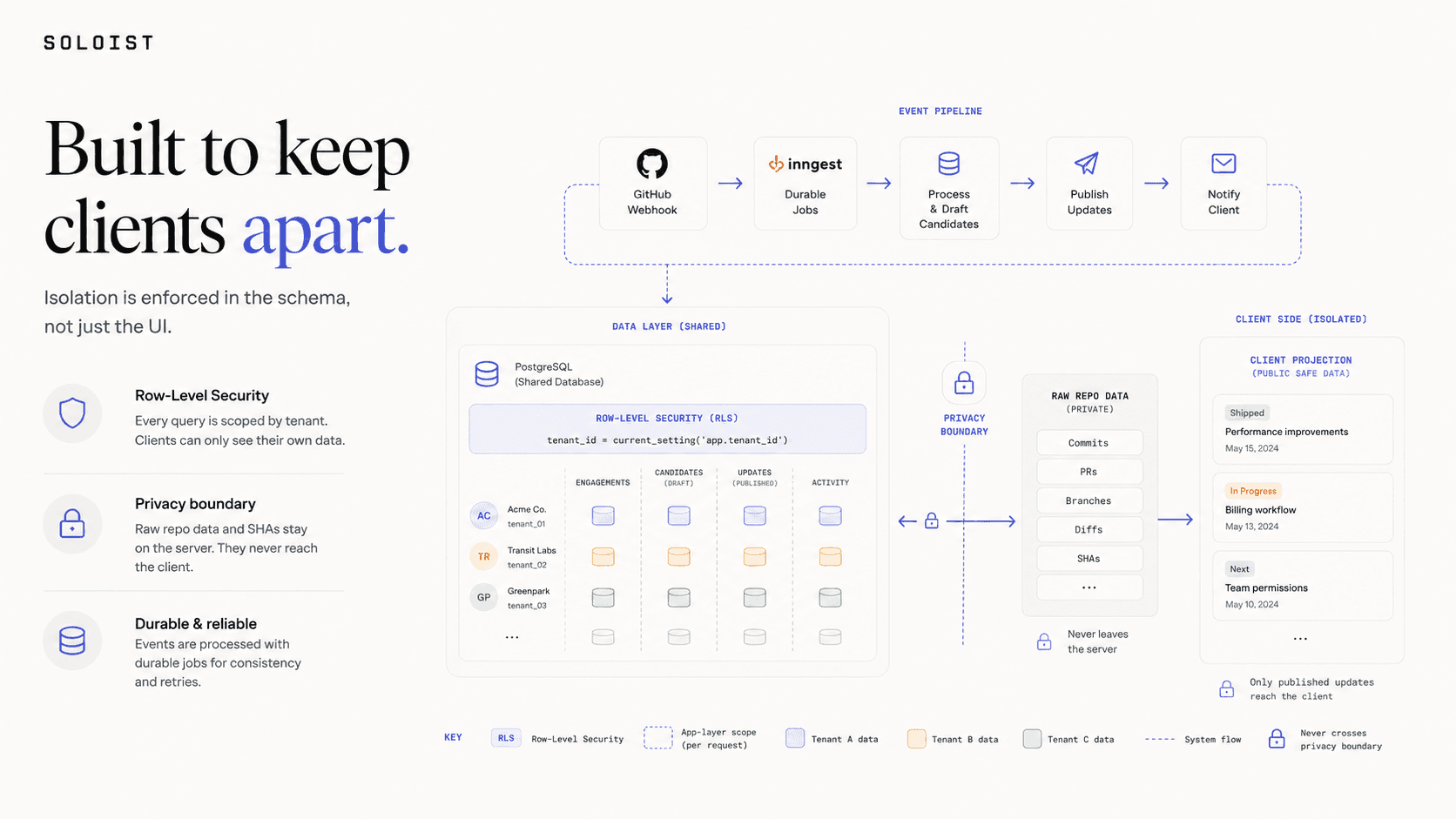
The core of Soloist is a pipeline I call the Ship Feed. A GitHub App watches the connected repos; when you push, open a PR, or cut a release, a durable job (Inngest) pulls it in and drafts a plain-English candidate update - 'feat:' becomes 'Added,' 'fix:' becomes 'Fixed,' and squash-merge noise gets filtered out.
Those candidates land in your Cockpit, never in front of the client. You're the quality gate: edit the wording, tag it Shipped, In Progress, or Next, dismiss what doesn't matter, and publish what does. Commit to client-ready update runs about five minutes - and there's a manual path for when you'd rather just write one yourself.
It's event-driven and idempotent end to end, with a nightly reconciliation pass to catch anything a missed webhook dropped, so the feed can be trusted.
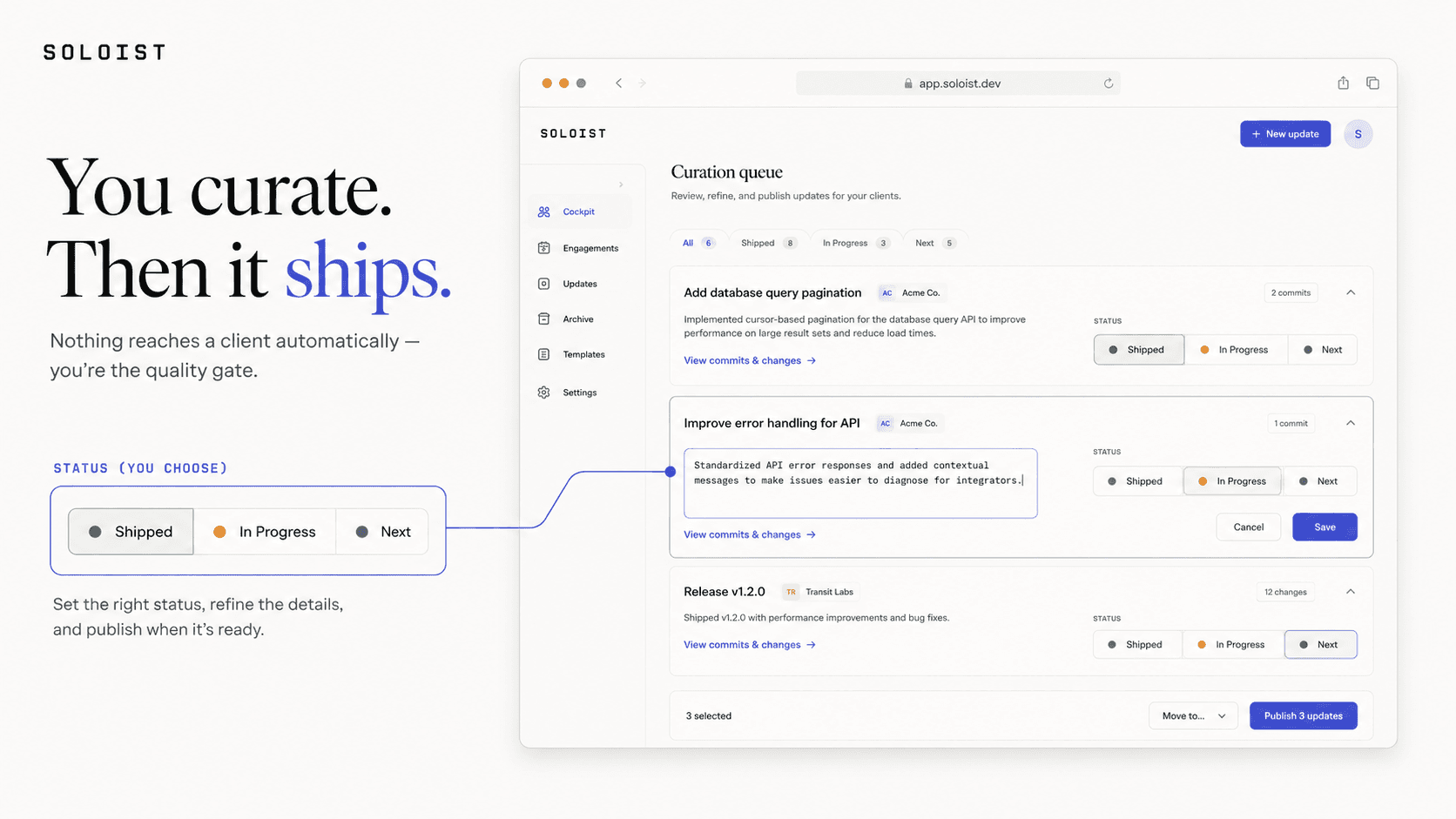
You curate, then it ships
Nothing reaches a client automatically. The Cockpit curation queue is built for fast triage: each candidate is inline-editable, status is a single toggle between Shipped, In Progress, and Next, and publishing is one action that flips a draft into something the client sees.
The status vocabulary is deliberately fixed and never per-client, so 'Shipped' always means the same thing - green for shipped, amber for in progress, slate for next - across every engagement.
Publishing fans out instantly: the client's feed updates, a branded email goes out, and a notification lands - the moment you decide it's ready.
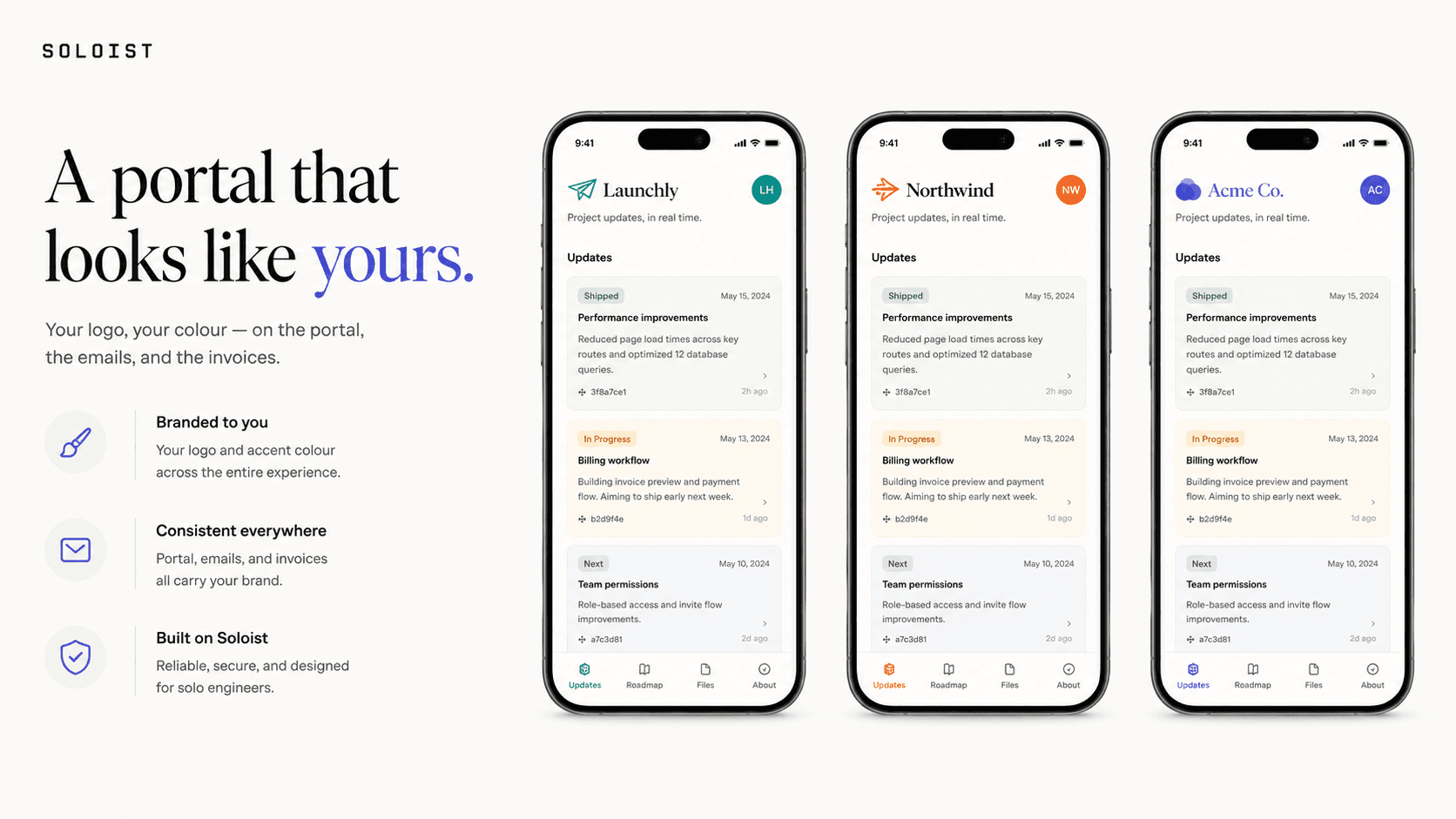
A portal that looks like yours
Every client portal is branded to the freelancer, not to Soloist. Upload a logo, pick an accent colour, and the portal, the emails, and the invoices all carry it - so to the client it feels like your product, not a third-party tool.
Branding is enforced, not just decorative: a three-way WCAG contrast guard checks the accent against white, against the page, and as a focus ring, auto-darkening the text shade so it always stays legible. A client never lands on an unreadable brand.
The portal itself is mobile-first - a chronological feed of published updates with status tags, plus notifications - because clients check progress from their phone.
Built to keep clients apart
Soloist is multi-tenant, and the isolation is enforced twice. Every tenant-scoped query goes through repositories that require a tenant context, and underneath, Postgres Row-Level Security fails closed - if the context isn't set, a query returns zero rows, not someone else's data.
The privacy boundary between you and your client is structural, not cosmetic. Draft candidates and the raw GitHub metadata - SHAs, diffs, branch names - live in columns the client projection never selects, so there's no API call that can leak them. The client simply sees the published, plain-English update.
The stack is modern and cost-conscious: Next.js 16 with server components and server actions, Neon Postgres via Drizzle, Inngest for durable jobs, Better Auth, a least-privilege GitHub App, Resend with React Email, and Vercel Blob - all serverless and scale-to-zero, so a solo operator can actually afford to run it.
Key decisions
A few constraints shaped the whole product and keep it trustworthy.
Curated, never auto-published
GitHub activity becomes a draft, never a live update. The freelancer is always the quality gate, so clients only ever see deliberate, plain-English progress.
Isolation in two layers
App-layer repositories require a tenant context, and the database enforces Row-Level Security as a fail-closed backstop - so a single bug can't turn into a cross-tenant data leak.
The boundary is the schema
Draft candidates and raw repo metadata aren't just hidden in the UI; they're excluded from the client projection, so they can't leak through the API either.
Branding with a contrast guarantee
Per-client accent colours pass a three-way WCAG check before they're saved, so a freelancer can't accidentally ship a portal a client can't read.
Status and what's next
Soloist is a personal product in active development, dogfooded on real client work - it's live at soloist.cjjutba.com with the source on GitHub. The core loop is shipping: sign up, brand your workspace, create an engagement, connect GitHub, curate the feed, invite a client, and publish updates they see in real time.
Next on the roadmap: a full notification centre with per-client preferences, invoicing (branded PDFs and a payment hand-off), and swapping the heuristic update summaries for an AI pass - the seam for it is already in place.
Boardly
Free boarding-house management - turn the paper rent ledger into bills, payment proof, and receipts.
SaaS · Web AppHave a project in mind? Let's build it.
I'm available for freelance projects, and open to the right full-time role.
I build web apps, SaaS, and MVPs for founders and startups. Tell me what you're working on.